

Robots don't fail alone
I built a browser simulation of autonomous robots moving pallets around a logistics hall, with real vehicle numbers and a small business layer on top. Here is what it taught me about systems.
At one point two robots in my simulation stood nose to nose for thirty simulated minutes. Neither was broken. Each was waiting, correctly, for the other to move. No line of code says "deadlock". It came out of the layout, the safety rules and the traffic, all at once.
That moment sums up most of what I learned. Each part of the simulation was simple and correct on its own. The interesting failures happened between the parts.
Make it look simple, keep the numbers real
The simulation looks like a toy: soft shading, outlines, chunky robots. Underneath, the numbers come from datasheets. Vehicle size, drive and lift speed, lift height, the range and angle of the safety laser scanners, pallet dimensions, the size of a standard trailer and the aisle widths a real site would plan. Where I couldn't find a published value I made an estimate and wrote down that it was one.
That split worked better than I expected. Nobody judges a simulation by how photorealistic it is. They judge it by whether a robot takes as long as they'd expect to cross the hall, lift a pallet to the top level and back out of a rack. Get those numbers right and people trust the rest. Marking estimates as estimates made it more credible, not less, because it shows you know where the gaps are.
Realism lives in the numbers, not the graphics. Say where you guessed.
Deadlocks are often geometry
My worst bug looked like a traffic problem. Robots working two rack bays that sat back to back would sometimes freeze. Each robot's safety scanner has a protective field: an area in front of the vehicle where any obstacle means stop. When a robot pulled into its bay, its field reached through the gap into the neighbouring bay. If another robot was there, both saw an obstacle, both stopped, and neither would ever move again.
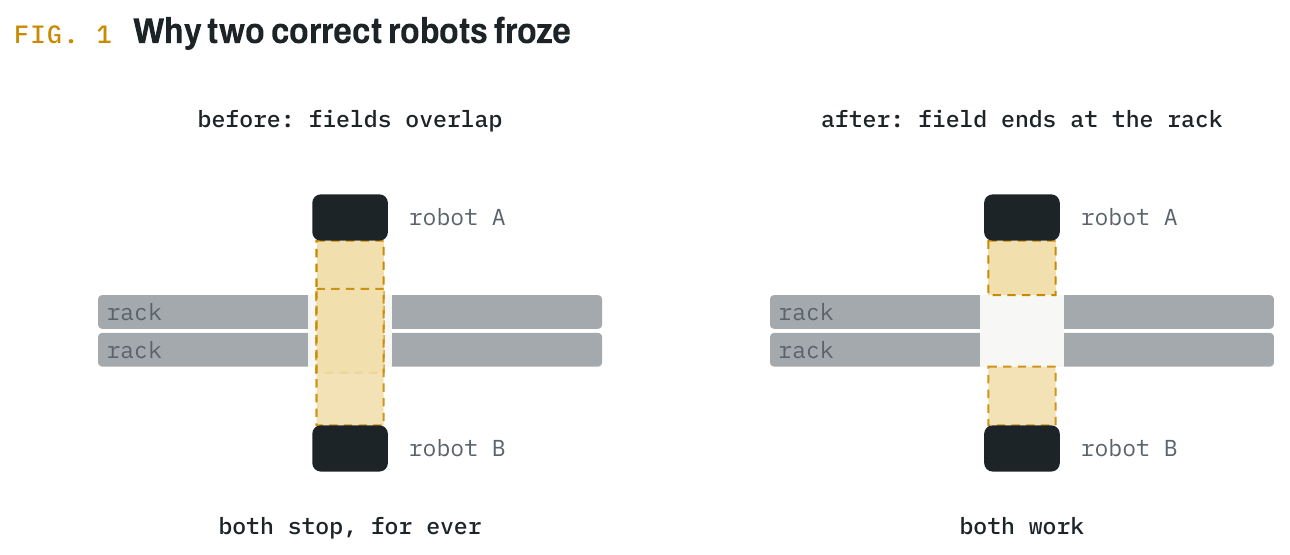
I could have written smarter traffic code: priorities, back-off timers, a negotiator. The fix was one rule instead: while docking at a rack, the field ends at the rack. The robot still protects everything in its own aisle, and it no longer reacts to a neighbour it could never reach.
If you write software, you've met this bug as two threads holding each other's locks. If you plan sites, you've met it as two aisles that are each fine and jam together. Either way the cure is often to change the shape of the problem rather than add cleverness on top.
A system that can't recover will drown
The first version of the business layer had a quiet flaw. Orders that couldn't be served just waited. If customers sent more work than the robots could handle, the queue grew, every order in it was late, and the operation never caught up even after demand dropped. In real life, customers don't wait for ever. They cancel and go elsewhere.
So I added that: an order nobody has started after 20 minutes is withdrawn. It earns nothing and counts as late, but it leaves the queue. To see what it does, I reran the small starter site with one robot and 70 orders an hour, which is almost exactly what that robot can carry, with and without the rule.
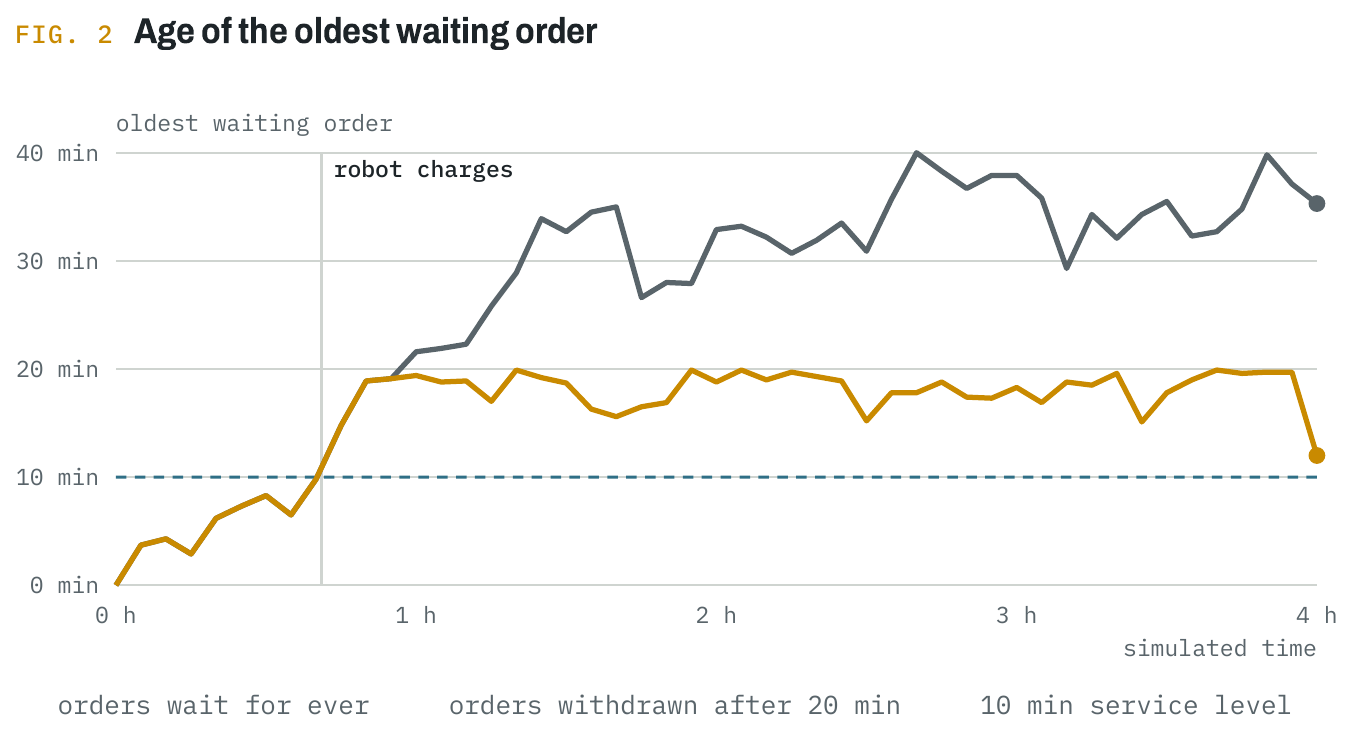
The run shows something I didn't expect. For the first 40 minutes everything is on time. Then, at 41 minutes, the robot goes to charge for about a quarter of an hour. In that time the queue jumps from 15 to 31 orders, and because the robot is running at about its capacity, it never earns that time back. Without withdrawals, the oldest order stays 30 to 40 minutes old for the next three hours and not a single order is on time again. One routine charging stop decided the rest of the shift.
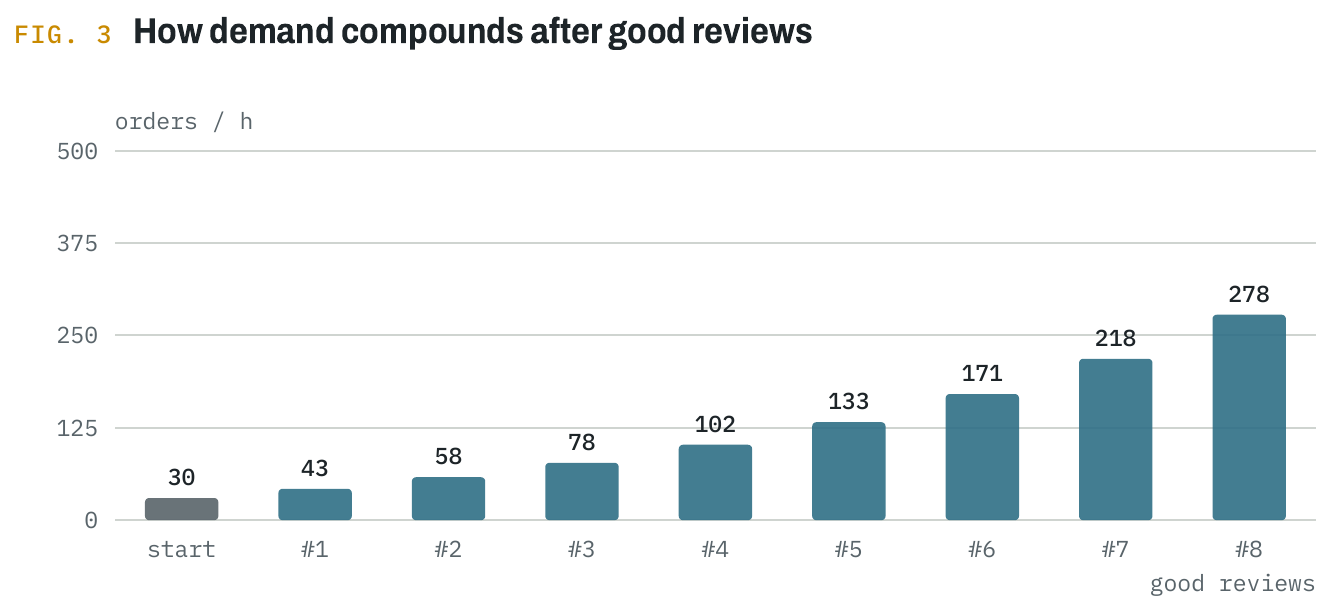
With withdrawals, the oldest order never gets past 20 minutes and the queue ends at 19 instead of 34. That bounds the damage, but it doesn't bring punctuality back: the robot still serves orders that are already late. The real recovery needs a second loop, and in the simulation that is the customer: after a bad review they send 15% fewer orders, which gives the fleet the headroom to catch up. Running at 100% leaves no room to absorb even a planned interruption.
A system running at capacity has no way back from a small delay. Leave headroom, and give the overload somewhere to go.
The opposite case matters as much. Customers in the simulation review the site every 30 minutes and send more work if it went well. That meant a player with idle robots had to sit and wait for the next review. Letting them ask for more work at any time, in small steps and only while the queue is short, removed the stall. Both fixes are about the same thing: design the path out of overload and out of underload, because either one stalls the whole operation.
Name the bottleneck
Simulations produce a lot of numbers: utilisation, queue length, cycle time, fill rate, charger occupancy. I had a panel for all of them, and it didn't help anyone decide what to do. What did help was one line of text naming the worst constraint right now and the action that addresses it: racks robots can't reach, orders no robot is allowed to take, a queue at the charger, racks nearly empty.
Choosing that line forces you to rank the problems, which is the work a dashboard leaves to the reader. It is useful well beyond simulations. Any monitoring setup gets better when it answers "what is the one thing holding us back?" before it shows the hundred things it can measure.
Let a script run the operation
To check the whole progression could actually be completed, I wrote a scripted player that does only what the simulation itself suggests: follow the current goal, act on the bottleneck line, nothing else. On three seeds it finished all twelve goals in 5 to 8.5 simulated hours.
That run proves the path exists. It does not prove the path is good, and I think that distinction matters for any automated test. The script also showed things I would not have found by clicking around: late in the run, cash piled up with nothing to spend it on; four or five robots were enough for 200 orders an hour on that small site; and one run lost half an hour to two robots gridlocked head on, which cleared by itself. Each of those became a change.
Build in layers
The order of work made all of this possible. Before adding any realism I split the simulation into separate systems behind one interface, and pinned its behaviour with golden tests that replay a fixed seed and compare the result. Then the vehicle's numbers moved into one swappable spec. Then safety, routing and localisation each went behind an interface of their own.
Only after that did the hard parts arrive: ray-cast safety scanners, any-angle navigation, scan-matching localisation against a map of the hall. Each one replaced a simple stand-in, and each landed without breaking the rest, because the tests said exactly what had changed. A simulation is a system of systems. Building it like one is what let it get realistic at all.
The overload figure comes from running the simulation headless on one seed and one small layout, so treat it as the shape of the effect rather than a general benchmark. The demand curve is calculated from the game's rule.